Price Improvements are pricing rules that adjust calculated prices into more sales-friendly values, for example by rounding prices, lowering round numbers, or changing the last digit.
Price Improvements can be used when running Calculate Price and Formulas actions. They can also be applied directly from the Products page via Actions, or from an individual product page. They are usually applied after the base price is calculated, so the final price looks cleaner and more optimized for marketplaces.
To manage Price Improvements, go to Automations > Price Improvements.
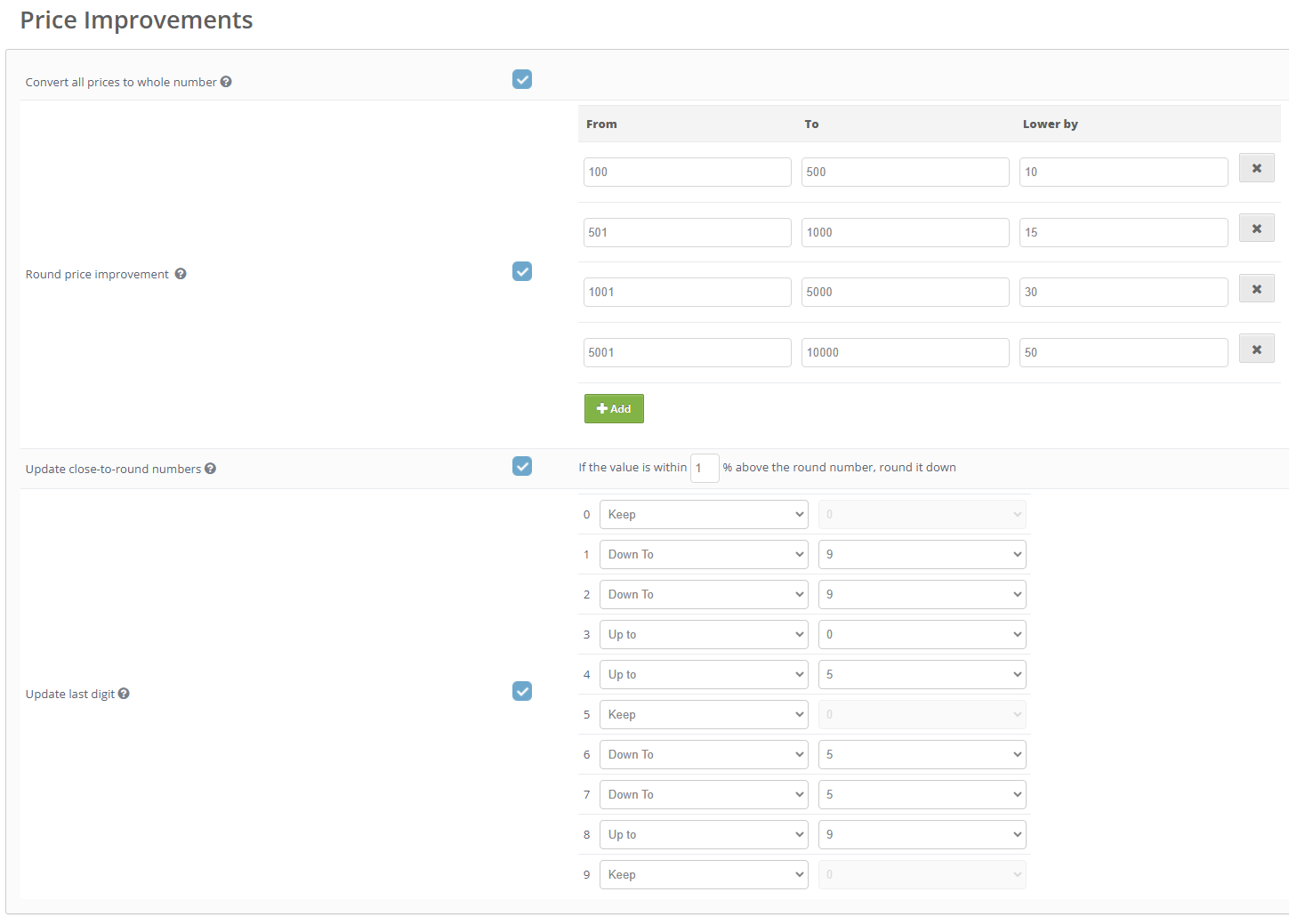
Price Improvement options
- Convert all prices to whole number- rounds prices to the nearest whole number.
- Example: 31.24 becomes 31
- Example: 31.68 becomes 32
- Round price improvement- lowers prices in selected round-number ranges by a defined amount.
- From - the start of the round-number range
- To - the end of the round-number range
- Lower by - the amount to subtract from prices in the selected range
- + Add - adds another range with its own rule
- Update close-to-round numbers- automatically lowers prices that are slightly above a round number.
- If value is X% above the round number, make it round number below - defines how close the price should be to a round number before it is lowered
- Update last digit- changes the last digit of the calculated price.
- Keep - keeps the current last digit unchanged
- Up to - changes the last digit to the selected digit by increasing the price
- Down to - changes the last digit to the selected digit by decreasing the price
How it works
Price Improvements do not calculate the base product price by themselves.
They adjust the result of a pricing action, such as Calculate Price or Formula, according to the selected improvement rules.
For example, after a formula calculates a price, Price Improvements can round it to a whole number, change the last digit, or reduce round prices to make them look more attractive.
 |
Was this article helpful?
That’s Great!
Thank you for your feedback
Sorry! We couldn't be helpful
Thank you for your feedback
Feedback sent
We appreciate your effort and will try to fix the article