To improve the visibility and performance of jewelry listings on eBay, Valigara offers Listing Renewal Automation.
This feature helps you automatically decide what to do with a listing after it ends: renew the existing listing, create a new similar listing, or stop reposting it.
There are two main renewal methods:
- Relist — renews the existing listing and keeps its history. This is useful for successful listings with sales, watchers, or views.
- Repost — creates a new independent listing, similar to the “Sell Similar” action on eBay. This is useful when you want to start fresh with a new listing history.
Each time jewelry is posted to eBay or other channels, the Post/Revise page allows choosing a renewal option under the Scheduling section.
To enable Listing Renewal Automation:
- Check Apply Rule next to Listing Renewal Automation.
- Select one of the available options:
- Smart renewal (Recommended)
- Relist
- Repost
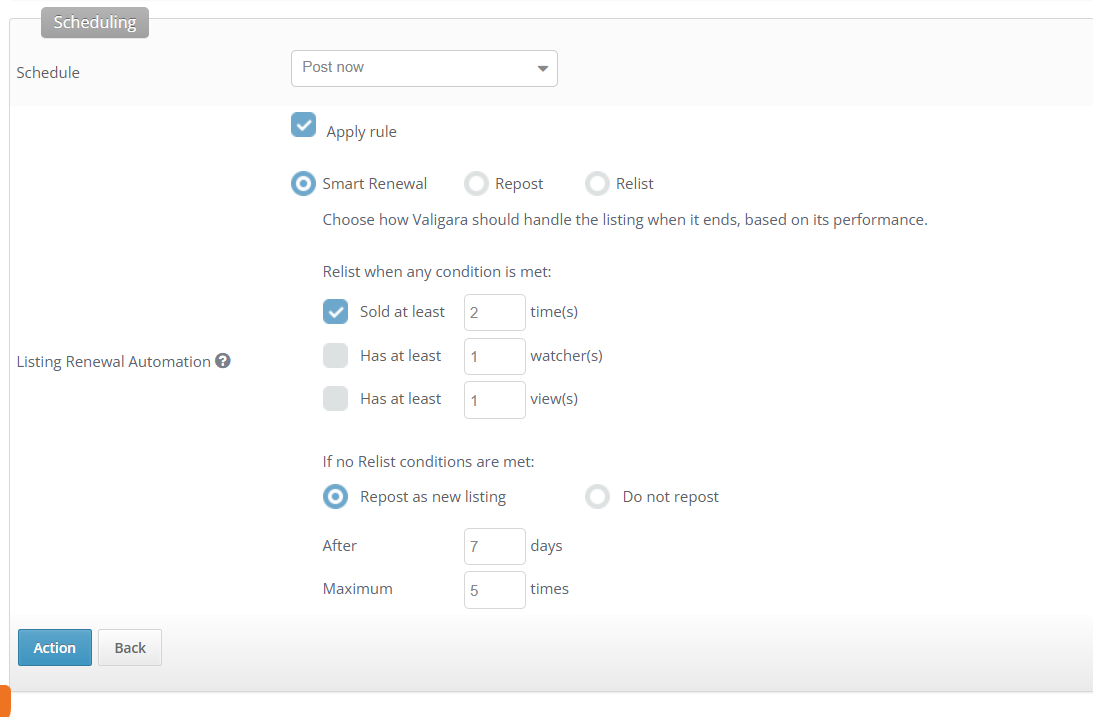
Smart Renewal
Choose how Valigara should handle the listing when it ends, based on its performance.
With this option, Valigara checks the listing performance and decides whether to relist it, repost it as a new listing, or stop reposting it.
If you want to automate supporting the listings with good summary, while giving a fresh start to the stuck ones, Smart Renewal is the recommended option.
Relist when any condition is met
Define when Valigara should relist the existing listing.
Available conditions:
- Sold at least X times
- Has at least Y watcher(s)
- Has at least Z view(s)
For each selected condition, enter a value of 1 or higher.
If no relist conditions are met
Choose what Valigara should do if the listing does not meet any of the selected relist conditions.
Available options:
- Repost as new listing — creates a new independent listing, similar to the “Sell Similar” action on eBay.
- Do not repost — Valigara will not create another listing.
For Repost as new listing, define:
- when the repost should run
- the maximum number of reposts
Relist
With this option, listings will be relisted after they end.
Use this option when you always want to renew the existing listing and keep its listing history.
Define:
- when the relist should run
- the maximum number of relists
Repost
With this option, Valigara creates a new independent listing after the current listing ends. This is similar to the “Sell Similar” action on eBay.
Use this option when you want to start fresh with a new listing history.
Define:
- when the repost should run
- the maximum number of reposts
 |
|
Was this article helpful?
That’s Great!
Thank you for your feedback
Sorry! We couldn't be helpful
Thank you for your feedback
Feedback sent
We appreciate your effort and will try to fix the article